
Prorise
这是我的博客,分享技术与生活的点点滴滴
第四章. BMAD 工作流与 Vibe Kanban 的深度整合
第四章. BMAD 工作流与 Vibe Kanban 的深度整合
Prorise第四章. BMAD 工作流与 Vibe Kanban 的深度整合
第三章我学过了,手动操作多个看板创建子任务太累了啊,有没有什么更轻量的方法呢?有的!那就是BMAD方法开发范式
如果还不明白BMAD的,建议去看一下我博客文章里的BMAD系列,这里不在多赘述,重点讲解Vibe KanBan如何结合BMAD
本章学习路径:
| 阶段 | 学习目标 |
|---|---|
| 理解整合逻辑 | 明白 BMAD 和 Vibe Kanban 的协作关系 |
| 安装 BMAD | 在项目中安装 BMAD 方法论包 |
| 配置 Agent 角色 | 使用脚本批量生成 Vibe Kanban 的 Agent 配置 |
| 自定义模型 | 通过 YAML 配置文件调整各角色使用的模型 |
4.0. 理解 BMAD 与 Vibe Kanban 的协作关系
在开始整合之前,我们需要先理解这两个工具的本质。
4.0.1. BMAD 是什么?
BMAD(Breakthrough Method for Agile AI-Driven Development)是一套 结构化的 AI 驱动开发方法论,它将软件开发拆解为四个阶段:

每个阶段的核心产物:
| 阶段 | 输入 | 输出 | 负责角色 |
|---|---|---|---|
| Analysis | 模糊的需求描述 | Product Brief(产品简报) | Analyst |
| Planning | Product Brief | PRD + 架构文档 | PM + Architect |
| Solutioning | PRD + 架构文档 | Story 文件(任务清单) | Solution Designer |
| Implementation | Story 文件 | 可运行的代码 | Developer |
4.0.2. Vibe Kanban 是什么?
Vibe Kanban 是一个 AI 代理的编排平台,它提供了:
- 任务管理:看板式的任务管理界面
- 并行执行:通过 Git Worktree 实现多任务并行
- 代码审查:内置 Diff 工具和 Review 流程
- 分支管理:自动创建和合并分支
Vibe Kanban 的核心能力:
让多个 AI Agent 在不同的工作目录中并行工作,互不干扰
4.0.3. 为什么需要整合?
如果只用 Vibe Kanban,你会遇到以下问题:
| 问题 | 说明 |
|---|---|
| 任务拆解混乱 | 不知道如何将大需求拆解为小任务 |
| Agent 角色不清 | 所有任务都用同一个 Agent,缺少专业分工 |
| 缺少文档沉淀 | 代码写完了,但没有 PRD、架构文档等文档 |
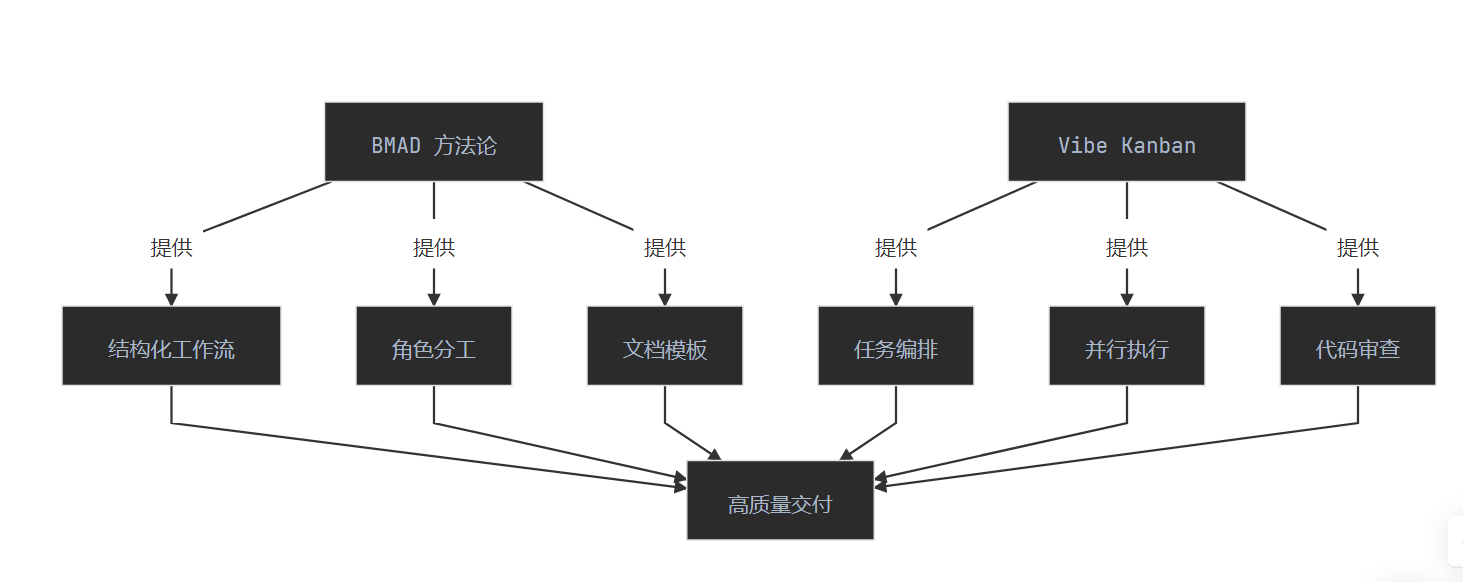
整合后的优势:
4.1. 在项目中安装 BMAD 方法论
BMAD 不是一个需要安装的软件包,而是一套 目录结构 + 文档模板 + Agent 配置 的组合。
4.1.1. 安装 BMAD 方法论包
在理解 BMAD 之前,我们先把 BMAD 的仓库拉下来看看。它以一个 Github 仓库 的形式存在,安装后会在你的项目里生成一个 _bmad 目录。
1 | npx bmad-method@alpha install |
安装程序会启动一个交互式配置向导。这个过程会问你一系列问题,我们逐个解释:
问题 1:安装目录
1 | ? Installation directory: C:\Users\YourName\Desktop\BMADTest |
这个没什么好说的,选一个你想放项目的地方。
问题 2:选择开发工具
1 | ? Select tools to configure: |
重要提示:这里必须选择 Claude Code!
虽然 BMAD 的本质是让 AI 去读取 _bmad 目录下的工作流文件,理论上选哪个 IDE 都能工作。但我们后面提供的 profiles.json 生成脚本是专门针对 Claude Code 配置设计的,所以这里必须选 Claude Code。
必须按空格键选中,然后按回车确认。只是高亮不算选中。
问题 3:配置语言和输出
1 | ? What shall the agents call you? Prorise |
这里有个关键点:对话语言和文档语言可以分开设置。
- 对话语言:AI 用什么语言跟你交流
- 文档语言:PRD、架构文档等工件用什么语言输出
我选了中文,因为 PRD 和架构文档用中文写更自然。但如果你的团队是国际化的,可以选英文。
问题 4:选择模块
1 | ? Select modules to install: |
这里有三个模块:
| 模块 | 全称 | 作用 |
|---|---|---|
| BMM | BMad Method | 完整的敏捷开发流程,包含 21 个 Agent 和 50+ 工作流 |
| BMB | BMad Builder | 用来创建自定义 Agent 和工作流 |
| CIS | Creative Innovation Suite | 创新和头脑风暴工具 |
第一次使用建议只选 BMM,因为想先体验标准流程。等熟悉了再用 BMB 定制自己的 Agent。
问题 5:是否启用 TTS
1 | ? Claude Code supports TTS (Text-to-Speech). Would you like to enable it? No |
这个功能可以让 AI 用语音跟你对话。我选了 No,因为这部分我们不需要,没必要下载额外依赖。
4.2. 使用脚本生成 Vibe Kanban 的 Agent 配置
BMAD 方法论定义了多个角色(Analyst、PM、Architect、Developer 等),我们需要在 Vibe Kanban 中为每个角色创建专用的 Agent 配置。
手动配置这些角色非常繁琐,所以我提供了一个 Python 脚本包,可以自动读取 BMAD 的 Agent 文件并生成 Vibe Kanban 的 profiles.json。
4.2.1. 下载脚本包
下载地址:https://prorise-blog.oss-cn-guangzhou.aliyuncs.com/博客文件存储/bmad_scripts.rar
下载后解压到项目的 scripts 目录:
1 | your-project/ |
4.2.2. 脚本包内容说明
| 文件 | 作用 |
|---|---|
generate_vibe_profiles.py | 主脚本,读取 _bmad 目录下的 Agent 文件,生成 profiles.json |
model_config.yaml | 模型配置文件,定义每个 Agent 使用的模型 |
profiles.json | 生成的配置文件,需要复制到 Vibe Kanban 目录 |
4.2.3. 运行脚本
确保你已经安装了 Python 和 PyYAML:
1 | pip install pyyaml |
然后运行脚本:
1 | cd scripts |
输出示例:
1 | ============================================================ |
4.2.4. 复制配置文件
将生成的 profiles.json 复制到 Vibe Kanban 的配置目录:
Windows 路径:
1 | %APPDATA%\bloop\vibe-kanban\data\profiles.json |
Mac/Linux 路径:
1 | ~/.config/bloop/vibe-kanban/data/profiles.json |
复制完成后,重启 Vibe Kanban 使配置生效。
4.3. 自定义模型配置
脚本包中的 model_config.yaml 文件允许你自定义每个 Agent 使用的模型。
4.3.1. 配置文件结构
1 | # Claude Code 中转模型设置 |
4.3.2. 可用模型列表
Claude Code 可用模型:
opus- 最强大,适合复杂任务sonnet- 平衡性能,推荐默认haiku- 轻量快速,适合简单任务
Gemini 可用模型:
gemini-3-pro-preview- 最强大gemini-3-flash-preview- 快速,推荐分析任务gemini-2.5-pro- 稳定版gemini-2.5-flash- 稳定快速版
Codex (OpenAI) 可用模型:
gpt-5.2-codex- 最新最强gpt-5.1-codex-max- 强大稳定gpt-5.1-codex-mini- 轻量快速
4.3.3. 按角色推荐的模型配置
| 角色 | 阶段 | Claude | Gemini | Codex |
|---|---|---|---|---|
| Analyst | Analysis | sonnet | gemini-3-flash-preview | gpt-5.1-codex-mini |
| PM | Planning | sonnet | gemini-3-flash-preview | gpt-5.1-codex-max |
| Architect | Solutioning | opus | gemini-3-pro-preview | gpt-5.2 |
| Dev | Implementation | sonnet | gemini-3-pro-preview | gpt-5.2 |
| Tech Writer | Documentation | haiku | gemini-3-flash-preview | gpt-5.1-codex-mini |
配置原则:
- 分析类任务(Analyst、PM)使用轻量模型,快速响应
- 架构设计(Architect)使用最强模型,需要深度推理
- 代码实现(Dev)使用平衡模型,兼顾速度和质量
- 文档写作(Tech Writer)使用轻量模型,简单任务
4.3.4. 修改配置后重新生成
修改 model_config.yaml 后,重新运行脚本即可:
1 | python generate_vibe_profiles.py |
然后将新生成的 profiles.json 复制到 Vibe Kanban 目录。
4.4. 生成的 Agent 配置说明
脚本会为每个 BMAD Agent 生成三种 Executor 的配置:CLAUDE_CODE、GEMINI、CODEX。
4.4.1. 生成的 Agent 列表
| Profile 名称 | 对应 Agent | 职责 |
|---|---|---|
| ANALYST | Mary | 需求分析、生成 Product Brief、市场研究 |
| PM | John | 创建 PRD、拆解 Epic、产品规划 |
| ARCHITECT | Winston | 架构设计、技术选型、系统设计 |
| DEV | Amelia | 代码实现、Story 开发、代码审查 |
| SM | Bob | Sprint 规划、Story 创建、敏捷管理 |
| TEA | Murat | 测试架构、ATDD、CI/CD 质量门禁 |
| TECH_WRITER | Paige | 技术文档、项目文档、图表生成 |
| UX_DESIGNER | Sally | UX 设计、UI 规划、线框图 |
| QUICK_FLOW_SOLO_DEV | Barry | 快速开发、技术规格、端到端实现 |
| BMAD_MASTER | BMad Master | 工作流编排、任务管理、知识管理 |
4.4.2. 配置结构示例
每个 Agent 的配置结构如下:
1 | { |
关键字段说明:
| 字段 | 说明 |
|---|---|
append_prompt | 追加到每次对话的系统提示词,包含 Agent 角色信息 |
claude_code_router | 是否启用 Claude Code 路由,一般设为 false |
dangerously_skip_permissions | 跳过权限确认,提高执行效率 |
disable_api_key | 禁用 API Key,使用 Vibe Kanban 的默认配置 |
plan | 是否启用 plan 模式,文档类 Agent 建议开启 |
4.5. 在 Vibe Kanban 中使用 BMAD Agent
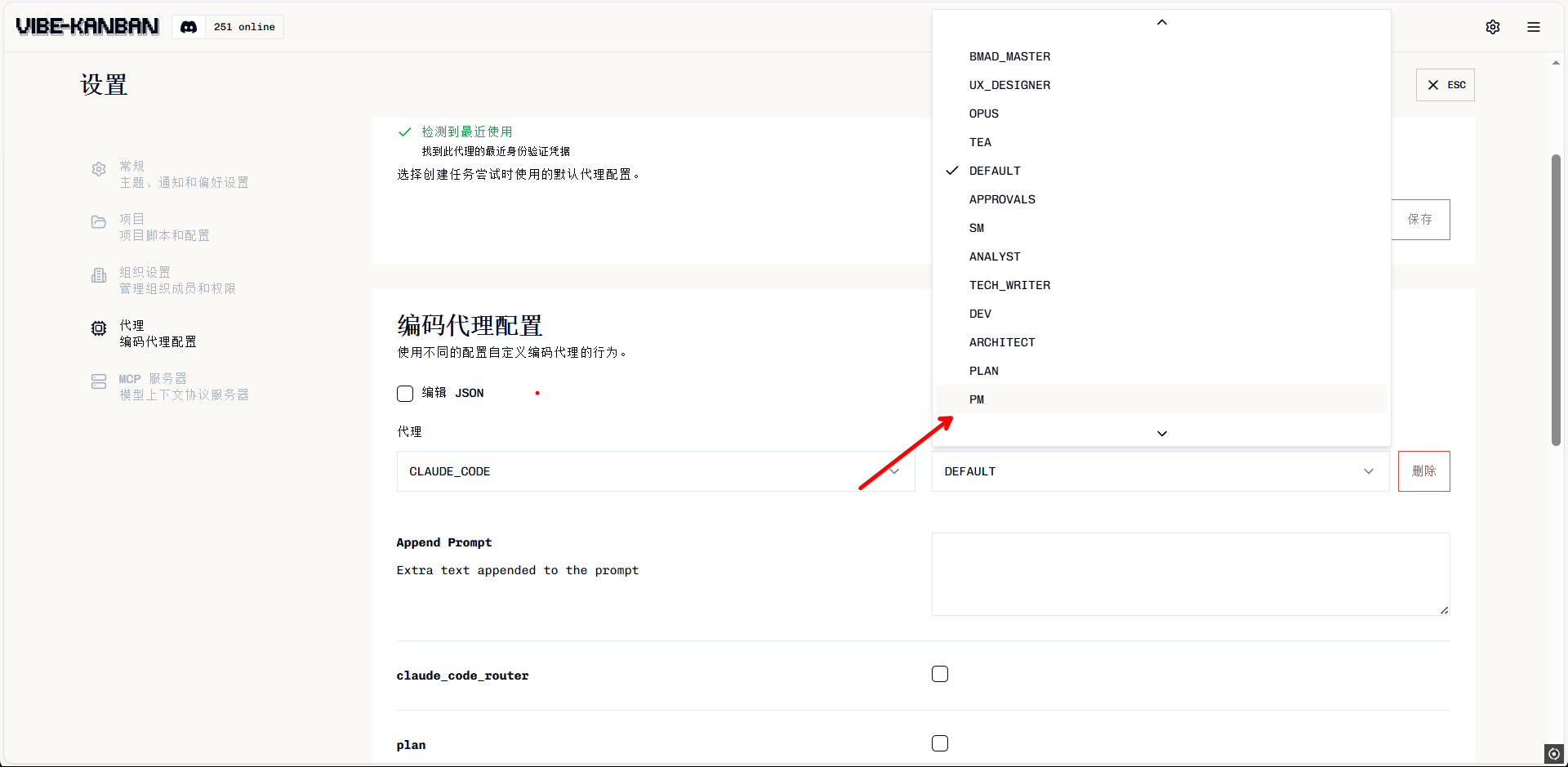
配置完成后,你可以在 Vibe Kanban 中创建任务时选择对应的 Agent。
4.5.1. 创建任务时选择 Agent
在 Vibe Kanban 中创建任务时:
- 选择 代理(Executor):CLAUDE_CODE / GEMINI / CODEX
- 选择 配置(Profile):ANALYST / PM / ARCHITECT / DEV 等
4.5.2. BMAD 工作流速查表
| 阶段 | 输入 | 输出 | Agent 角色 | 关键产物 |
|---|---|---|---|---|
| Analysis | 模糊需求 | Product Brief | ANALYST | _bmad-output/product-brief.md |
| Planning | Product Brief | PRD + 架构文档 | PM + ARCHITECT | _bmad-output/prd.md_bmad-output/architecture.md |
| Solutioning | PRD + 架构文档 | Story 文件 | SM | stories/{module}/{stage}-{num}-{name}.md |
| Implementation | Story 文件 | 可运行代码 | DEV | 代码文件 + 测试文件 |
4.6. 本章小结
核心要点回顾
1. BMAD 的本质
BMAD 是一套结构化的工作流方法论,将开发拆解为 4 个阶段:Analysis → Planning → Solutioning → Implementation。
2. 安装注意事项
安装 BMAD 时必须选择 Claude Code 配置,因为我们的脚本是针对 Claude Code 设计的。
3. 使用脚本生成配置
- 下载脚本包到
scripts目录 - 运行
python generate_vibe_profiles.py - 将生成的
profiles.json复制到 Vibe Kanban 配置目录
4. 自定义模型配置
通过修改 model_config.yaml 可以为不同角色配置不同的模型,实现成本和性能的平衡。